








Feature

Simple by default. Precise when you want it.

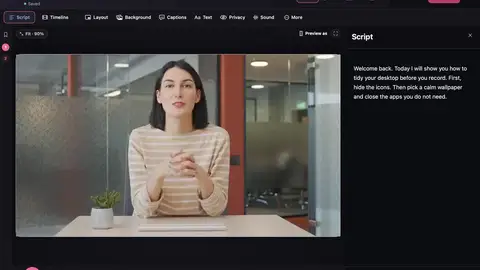
Most videos only need the script. When you want more control, open the timeline. Every clip, sound, zoom and caption sits on its own track, and you can change it there.

  • Free plan
  • No watermark
  • macOS 15 or later
The editor with the timeline open: camera, screen, sound, captions, zooms and layout tracks, and the tool strip.

The problem

Most editors show you everything at once.

  1. A wall of tracks before you’ve started

    Start with just the script

  2. No way to fine-tune a cut

    Open the timeline when you want it

  3. Sound that jumps up and down

    Volume and fade lines

On the timeline

Five tools

Select (V), Cut (C), Hand (H), Zoom (Z) and Pen (P) sit beside the timeline, one click away.

Volume and fade lines

Every clip has a volume line and a see-through line. ⌘-click to add a point, then drag it.

Transitions

Drag a transition onto a cut. A guide line shows where clips will snap.

Drag in anything

Drop a video, picture or song onto a track, or onto a new one.

Chapters

Make chapters from what you said, then rename them or drag them on the timeline.

History

Undo says exactly what it undid, and History shows every step.

Edit with the keyboard

  • J, K, L play backwards, pause and play forwards. Press again for 2× and 4×.
  • I and O mark a part. ⇧⌫ removes it and closes the gap.
  • S splits a clip where you are.
  • ⌘/ shows every shortcut. ⌘K opens Quick actions, where you can type to find any tool.

Right-click any clip to edit or delete it. Rows can be taller or shorter, and the editor stays smooth on older Macs.

In the app

Questions

Do I have to use the timeline?

No. You can make a whole video by editing the script. The timeline is there when you want more control.

Is the timeline free?

Yes. Everything on this page is in the free plan.

Make your next video on your Mac.

  • Free to startRecord, edit and save a finished video on the free plan.
  • No watermarkNot even on the free plan.
  • Stays on your MacYour projects and recordings are saved on your Mac.

Requires macOS 15 or later.